Google Business Profile Suspended? Here's How to Get It Reinstated
Waking up to find your Google Business Profile suspended is one of the worst surprises a small business owner can get. One day your listing is showing up in the map pack, and the next it's gone from Google Search and Google Maps entirely, along with your reviews, photos, and the calls that come with them.
The good news: most suspensions are recoverable if you understand why they happen and follow the reinstatement process correctly. This guide walks you through both, in plain language, no technical background required.
Why Google Business Profiles Get Suspended
Google runs your profile through automated trust and policy checks, and increasingly through AI-assisted review, before it ever shows up in search results. When something looks off, Google suspends the listing first and asks questions later. This happens because Google's automated trust and policy systems detect potential guideline violations, verification inconsistencies, or suspicious activity associated with the profile.
Enforcement has gotten noticeably tighter recently. Google has removed or blocked hundreds of millions of policy-violating actions across business profiles, and the introduction of Gemini AI now lets Google's systems flag suspicious behavior in real time. That combination is why so many legitimate, longstanding businesses are getting caught up in suspension waves alongside actual spam accounts.
Here are the most common triggers, based on current industry reporting:
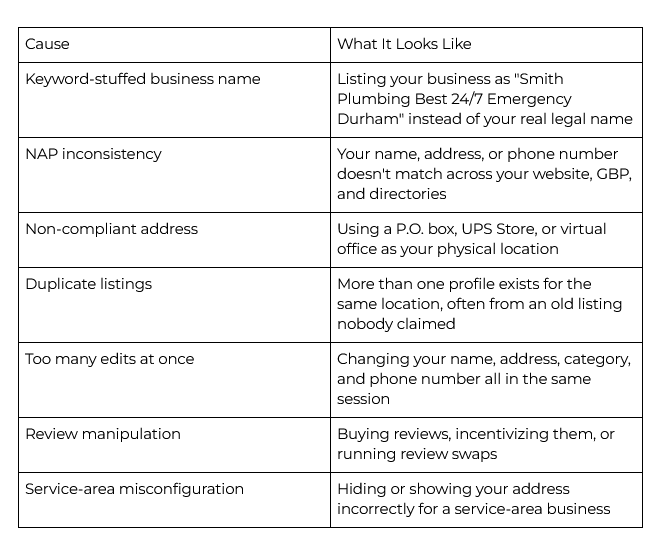
A suspension is most often triggered by a keyword-stuffed name, a name and address mismatch, a wrong or overly broad category, or too many edits made at once. Making several of those changes in a short window looks to Google's systems like someone trying to hijack or game the listing, and brand-new profiles are especially fragile.
It is worth knowing that suspensions come in two flavors:
Soft suspension: Your listing still exists and your data (reviews, photos, posts) usually stays intact, but you lose the ability to manage or verify it. This is the more common and more recoverable type.
Hard suspension: The listing is pulled from Search and Maps entirely, often reserved for repeat or clear-cut violations, or for businesses without a legitimate customer-facing location.
What to Avoid
A few habits make suspensions more likely, and make reinstatement harder if you're already dealing with one:
Don't add descriptors, service areas, or keywords to your business name field.
Don't make bulk edits to your name, address, phone, and category in the same sitting.
Don't use a mailbox rental, coworking space, or virtual office as your storefront address.
Don't create a second listing because you can't access the first one. That's how duplicates happen.
Don't incentivize or purchase reviews. It is against Google's policies and a common trigger for manual review.
Once you've filed an appeal, don't keep editing the profile. New edits only delay Google's review and create further suspicion.
Step 1: Verify Your NAP Is Rock Solid
NAP stands for Name, Address, and Phone number, and it's the foundation Google checks before anything else. Incorrect or inconsistent NAP information is one of the most common reasons a Google Business Profile gets suspended, and your business details need to match across your website and every other place you appear online in order to maintain credibility.
Before you touch the reinstatement form, go through this check:
Business name matches your legal or DBA name exactly, with no extra descriptors.
Address is formatted identically everywhere, same suite number, same abbreviations, no typos.
Phone number is a single primary local number, written the same way on your site, your GBP, and directories like Yelp, Apple Maps, and the Better Business Bureau.
Category accurately reflects your primary service, not something broader or unrelated.
Website and hours match what a customer actually experiences when they call or visit.
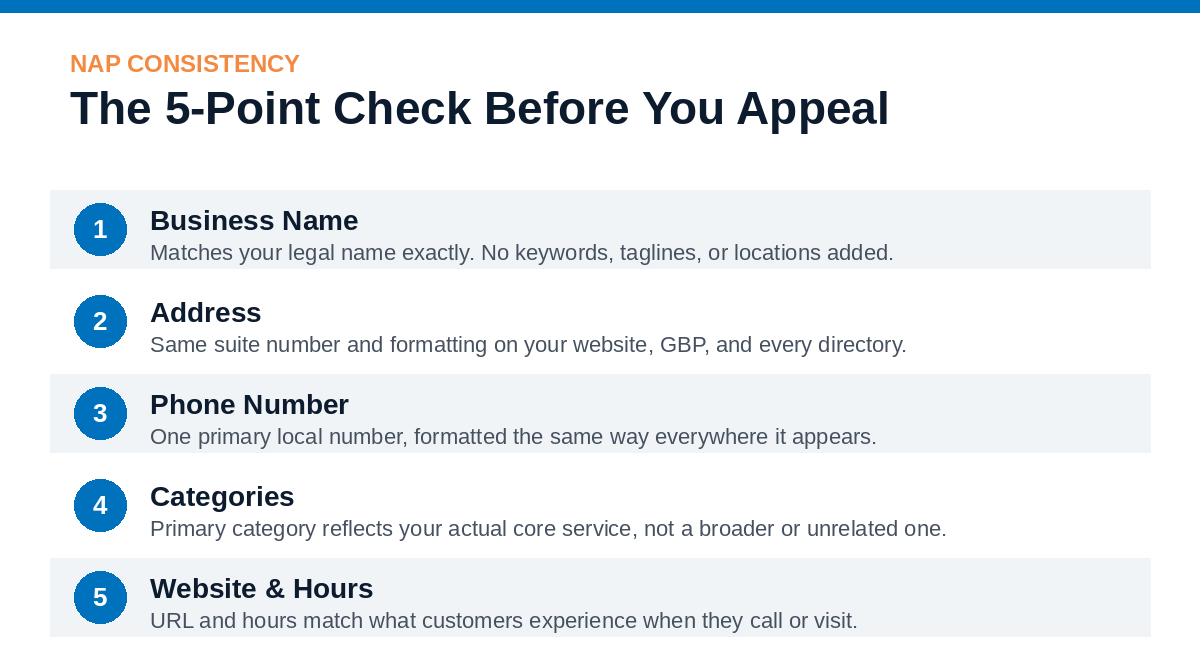
Run a quick audit across your website footer, email signature, social profiles, and any directory listing you can find. Even small formatting mismatches (a missing suite number, "St" vs "Street") are enough to trip Google's trust checks.
Step 2: Gather Your Evidence Before You File
Reinstatement is an appeal, not a resubmission, so order matters. Fix the underlying issue first, then file once with strong documentation. Have these ready before you start:
Business registration or Articles of Organization
Business license, if applicable to your industry
A utility bill or lease showing your business name and address
Photos of your storefront, signage, or interior for physical locations
Tax documents or an EIN letter, if requested
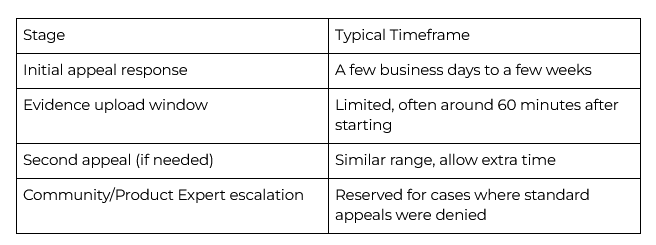
Providing as much documentation as possible is key to a successful reinstatement, and you'll typically have a limited window, often around 60 minutes, to upload evidence once you begin the appeal form, so have everything saved and ready to go before you click start.
Step 3: Submit Your Reinstatement Request
Go to Google's Business Profile appeals tool and sign in with the account tied to your listing.
Select the profile you want to appeal.
Choose the suspension or restriction you're appealing.
Submit the appeal, then immediately move to the evidence form.
Upload your documentation within the time window provided.
Wait for Google's email decision. Do not edit your profile in the meantime.
Google will not provide detailed context behind its decision, so it is essential to review and correct any likely violations before you submit. If your first appeal is denied, most businesses get one more shot at a second appeal. Use it carefully, and only after confirming your documentation and profile details are fully aligned.
How Long Does Reinstatement Take?
Timelines vary depending on the complexity of the case and how backed up Google's review queue is. Google typically completes its review of a reinstatement request within one to five weeks, though the timeline can extend further due to backlog. Simpler cases with clean documentation tend to move faster.
While you wait, don't put all your eggs in one basket. Keep other directories (Apple Maps, Bing Places, Yelp) updated, lean on social media and email to reach existing customers, and let them know your Google listing is temporarily unavailable.
If Your Appeal Is Denied
Don't panic, and don't immediately resubmit. Review the reasons a denial typically happens:
Your documentation didn't match the business name and address exactly.
The underlying violation wasn't actually fixed before you filed.
Something about the profile still reads as inconsistent or incomplete to Google's systems.
Fix what's flagged, double-check every NAP detail one more time, and then file the second appeal with tighter documentation. If that's also denied and you genuinely believe the decision is wrong, Google's Business Profile community forum has volunteer Product Experts who can review your case and escalate it internally when it has merit.
The Bottom Line
Most Google Business Profile suspensions come down to something fixable: a name that doesn't match your paperwork, an address that doesn't match your website, or a batch of edits that looked suspicious to an algorithm. Fix the root cause first, document everything, and file a clean, complete appeal. Patience matters here too. Rushing a second appeal before you've actually solved the problem tends to cost more time than it saves.
Need Help Getting Your Listing Back?
If your Google Business Profile is suspended right now, or you just want to make sure it never happens in the first place, we can help. Our team handles GBP audits, NAP cleanup across every directory that matters, and reinstatement appeals for business owners who would rather not lose another week of calls to a guessing game.

Let's discuss your challenges, potential solutions, and see if we're even a good fit.
Sources: Birdeye State of Google Business Profile 2026 Report; Digilatics; OMG National; Reinstate Labs; RenewLocal; Thryv; TheeDigital; Google Business Profile Help Center; GBP Guardian.
