Is Your CRM Helping or Hurting? Signs It's Time to Switch
The question worth asking: What should a CRM actually do for a small business?
When we ask business owners what they use their CRM for, the most common answer is: 'storing contacts.' That's a $500/month filing cabinet.
---
The Promise vs. The Reality of Most CRM Platforms
CRMs were sold to small businesses on the promise of organization, automation, and visibility. For many, the reality is a system that takes hours to maintain, still loses leads, and gets used by about half the team — if that.
The market for CRM software is dominated by platforms built for enterprise sales teams with dedicated admins, technical staff, and 90-day onboarding timelines. When a 10-person business tries to use that infrastructure, the complexity doesn't shrink — it just lands on whoever drew the short straw.
The tool that was supposed to make your business run smoother becomes another job.
5 Signs Your CRM Is Working Against You
1. Your team works around it, not with it.
If contacts are still tracked in spreadsheets, sticky notes, or someone's personal inbox "just to be safe," your CRM hasn't been adopted. A tool nobody uses is worse than no tool — it creates a false sense of having a system.
2. You're paying for features you've never touched.
Most SMBs use 20–30% of their CRM's capabilities while paying for 100% of the platform. If you can't name five features you used this week, you're likely over-licensed.
3. Leads still fall through the cracks.
If a lead can submit a form, get no automated response, and never be followed up with — and you only find out weeks later — your CRM isn't doing its core job.
4. You need a developer to change a workflow.
Any system that requires technical resources to update a follow-up sequence is too rigid for a growing business. You should be able to change a workflow in minutes, not file a ticket.
5. You have no idea what your pipeline actually looks like right now.
If you can't answer "how many active leads do I have and what stage are they in?" in under 30 seconds, your CRM isn't giving you visibility — it's giving you data storage.
What a Modern All-in-One Platform Actually Does
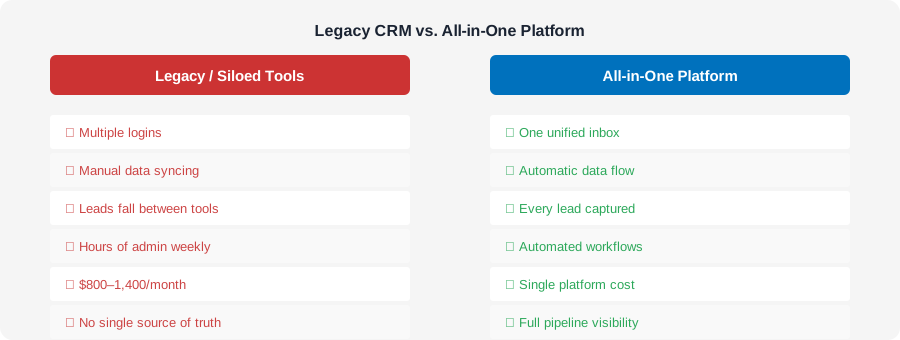
The shift away from bloated CRMs toward all-in-one platforms isn't about getting fewer features — it's about getting the right ones integrated into a single system that works together from day one.
An effective platform for an SMB consolidates:
Contact management — with source tracking, tags, and conversation history
Pipeline visibility — customizable stages with automation triggers at each
Multi-channel communication — SMS, email, and voice from one inbox
Automated follow-up — sequences that fire on entry without manual setup
Appointment booking — integrated calendar with automated reminders
Reporting — real numbers on what's converting and what's not
When these live in separate tools, data gets lost in the handoffs. When they live in one platform, the system compounds — each action informs the next automatically.
The Real Cost of CRM Sprawl
The average SMB running disconnected tools spends $800–$1,400/month across CRM, email marketing, SMS tool, scheduling software, and call tracking. That doesn't account for the time spent manually moving data between systems or the leads lost in the gaps.
Consolidation isn't just about saving money — though it typically does. It's about creating a closed loop where no lead, conversation, or follow-up falls outside the system.
When everything is connected, your marketing data informs your sales process. Your sales data informs your follow-up. Your follow-up data informs your campaigns. That compounding effect is what separates businesses that scale from ones that stay stuck.
How to Evaluate a CRM Switch Without Disrupting Operations
Switching CRMs is a real operational decision, and it shouldn't be rushed. But it also shouldn't be deferred indefinitely because the current system is "good enough."
Before evaluating a switch, document:
What workflows your team actually uses today (not what the CRM can theoretically do)
Where leads are falling through — at what stage, and why
What tools you're paying for that could be replaced by a unified platform
What your team would need to see to actually adopt a new system
The goal isn't to find a more impressive CRM. It's to find a system your whole team will use, that closes the gaps in your current process, and that doesn't require a full-time admin to maintain.
That standard eliminates most enterprise platforms immediately — and points toward something purpose-built for how small businesses actually operate.
---
Frequently Asked Questions
What's the difference between a CRM and an all-in-one marketing platform?
A CRM primarily manages contact data and pipeline stages. An all-in-one platform adds communication tools (SMS, email, voice), automation, booking, and reporting — eliminating the need for separate tools and the data gaps between them.
Is it worth switching CRMs if my team is already trained on the current one?
Training cost is real but often overstated. If your current system is causing leads to fall through, discouraging adoption, or requiring manual workarounds, the cost of staying is typically higher than the cost of switching.
How many features does a small business actually need in a CRM?
Most SMBs need contact management, pipeline tracking, automated follow-up, multi-channel communication, and reporting. Anything beyond that should be evaluated based on actual use — not theoretical value.
---
